Reservation Changes
The Reservation Changes report allows users to view all information changes on the reservation for the date selected. As a property manager, user can use this information to track the number of altered reservations for the property. When a confirmation number is available, it’s linked to the reservation and opens in a separate tab when selected. It’s not available if it does not appear in the report.
Perform the following steps to generate the report:
Navigate to Reports ➜ All Reports ➜ Reservation Changes (under Guests/Reservations).

Select a date from the calendar to generate dates for the report.
Enter which Filter By field options to include in the report.
Click Generate. The report with the selected data appears.
Click Print to send a copy of the report to the printer.
Sample Report
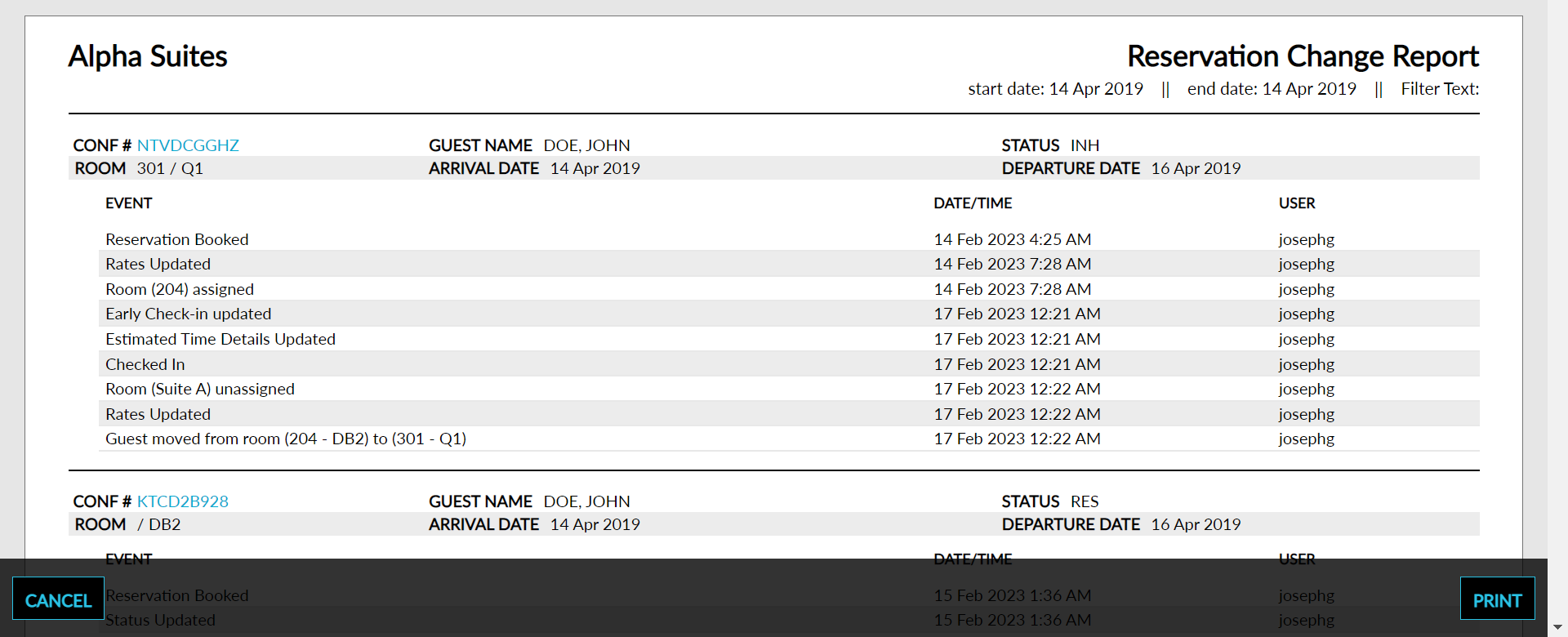
Report Parameters
This report displays the following parameters:
|
Field |
Description |
|---|---|
|
Conference Number |
The conference number that the guest is associated with, if assigned. |
|
Room |
The room number that the guest is staying in, if assigned. |
|
Guest Name |
The guest name on the reservation. |
|
Arrival Date |
The arrival date for the reservation. |
|
Status |
The reservation status that indicates whether the reservation is still in house, due to depart, or already departed. |
|
Company Name |
The name of the company on the reservation. |
|
Confirmation Number |
The confirmation number on the reservation. |
|
Status |
The reservation status that indicates whether the reservation is still in house, due to depart, or already departed. |
|
Departure Date |
The departure date for the reservation. |
|
Event |
The details of the reservation associated with the event. |
|
Date/Time |
The time that each change was made including hour, minutes, and seconds. |
|
User |
The username used to make the changes to the reservation. |